


Asset depreciation in Desk365 helps you track how an asset’s value decreases over time. This is especially useful for finance reporting, lifecycle planning, audits, and replacement decisions.
Depreciation in Desk365 is calculated monthly, ensuring that the asset’s book value is always up to date and reflects real usage time.
This article explains:
- What depreciation means in Desk365
- The available depreciation methods
- How calculations work (with simple examples)
- How to configure depreciation step by step
- How depreciation appears in the asset creation form
Asset depreciation in Desk365
When you purchase an asset (for example, a laptop for $100,000), its value does not remain the same forever. Over time:
- It experiences wear and tear
- It becomes outdated
- Its resale value decreases
Depreciation is the accounting method used to spread the asset’s cost over its useful life.
In Desk365, depreciation:
- Is calculated monthly
- Updates the asset’s book value automatically
- Never allows book value to fall below the salvage value
- Stops once the useful life ends
Key terms you should understand
Before configuring depreciation, it’s important to understand these terms:
- Cost – The original purchase price of the asset.
- Salvage Value – The estimated value of the asset at the end of its useful life.
- Useful Life (Years) How long you expect the asset to be used.
- Useful Life (Months) – Useful Life (Years) × 12
- Months Elapsed – Number of completed months since the purchase date.
- Depreciable Base – Cost − Salvage Value. This is the total value that will be depreciated.
Depreciation methods available in Desk365
You can configure depreciation under Settings > Asset Management > Depreciation
Desk365 supports three methods:
- Straight-Line (SL)
- Declining Balance (DB)
- Sum-of-the-Years’-Digits (SYD)
Let’s understand each one clearly.
1. Straight-Line Depreciation (SL)
Straight-Line Depreciation is the simplest and most commonly used depreciation method. In this approach, the asset loses the same amount of value every month throughout its useful life.
The formula for monthly depreciation is:
Monthly Depreciation = (Cost − Salvage Value) ÷ Useful Life (in months)
The book value at any point in time is calculated as:
Book Value = Cost − (Monthly Depreciation × Months Elapsed)
For example, if an asset costs 100,000, has a salvage value of 10,000, and a useful life of 5 years (60 months), the depreciable base would be 90,000. Dividing 90,000 by 60 months gives a monthly depreciation of 1,500. After 10 months, the accumulated depreciation would be 15,000, and the book value would be 85,000.
This method is best suited for assets such as furniture, office equipment, and other items with steady and predictable usage patterns.
2. Declining Balance (DB)
The Declining Balance method is an accelerated depreciation method where the asset depreciates faster in the earlier years and more slowly in later years. This approach reflects real-world usage patterns for assets that lose value quickly, especially technology-related equipment.
In Desk365, the annual depreciation rate is calculated as:
Annual Rate = 1 ÷ Useful Life (in years)
The monthly rate is derived using:
Monthly Rate = 1 − (1 − Annual Rate)^(1/12)
The book value is then calculated as:
Book Value = Cost × (1 − Monthly Rate)^MonthsElapsed
For instance, if an asset costs 100,000 and has a useful life of 5 years, the annual rate would be 20%. The calculated monthly rate would be approximately 1.86%. After 12 months, the book value would be approximately 80,000.
This method is particularly suitable for IT equipment, laptops, servers, and other electronic devices that experience rapid value decline in the initial years.
3. Sum-of-the-Years’-Digits (SYD)
The Sum-of-the-Years’-Digits method is another accelerated depreciation method, but it follows a more structured calculation compared to the Declining Balance method. It results in higher depreciation in the earlier years, with the expense gradually decreasing over time.
First, the SYD value is calculated using:
SYD = N(N + 1) ÷ 2, where N represents the useful life in years.
The yearly depreciation is then determined by:
Yearly Depreciation = Depreciable Base × (Remaining Life ÷ SYD)
Monthly depreciation is calculated proportionally from the annual amount.
For example, if an asset costs 100,000, has a salvage value of 10,000, and a useful life of 5 years, the depreciable base would be 90,000. The SYD would be calculated as 5 × 6 ÷ 2, which equals 15. In the first year, depreciation would be 90,000 × (5 ÷ 15), resulting in 30,000. This translates to a monthly depreciation of 2,500 i.e., 30,000 ÷ 12 . After 6 months, the accumulated depreciation would be 15,000, and the book value would be 85,000.
This method works well for vehicles, machinery, and other assets where the decline in value follows a predictable but accelerated pattern.
Built-in safeguards in Desk365
Desk365 ensures:
- Book value never falls below salvage value
- Depreciation stops after useful life ends
- Negative depreciable base is handled gracefully
- Monthly calculations are consistent and automated
This prevents accounting errors and over-depreciation.
How to configure depreciation in Desk365
Step 1: Navigate to depreciation settings
Go to Settings > Asset Management > Depreciation
You will see the depreciation list screen showing:
- Depreciation Name
- Depreciation Type
- Useful Life
- Description
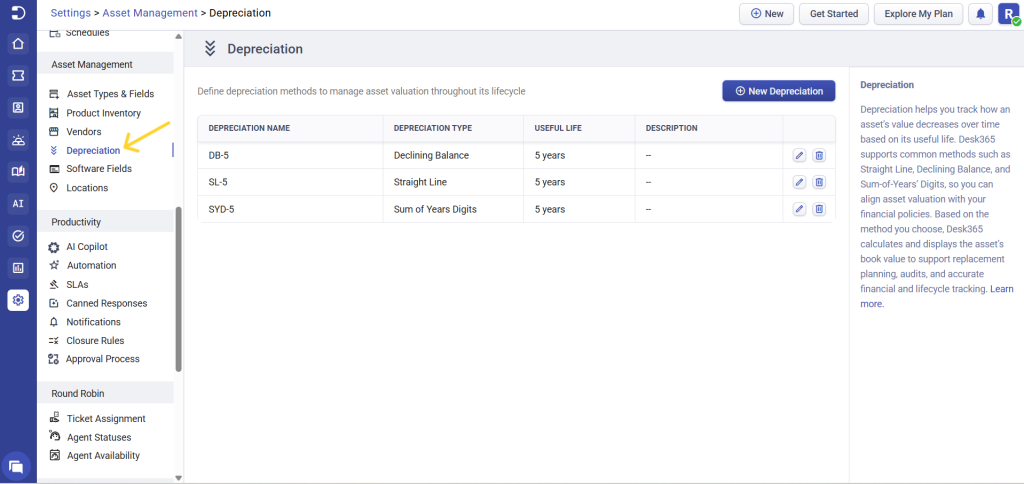
Step 2: Create a new depreciation method
Click new depreciation. In the “New Depreciation” window fill in the depreciation name, type, useful life in years and a description if required.
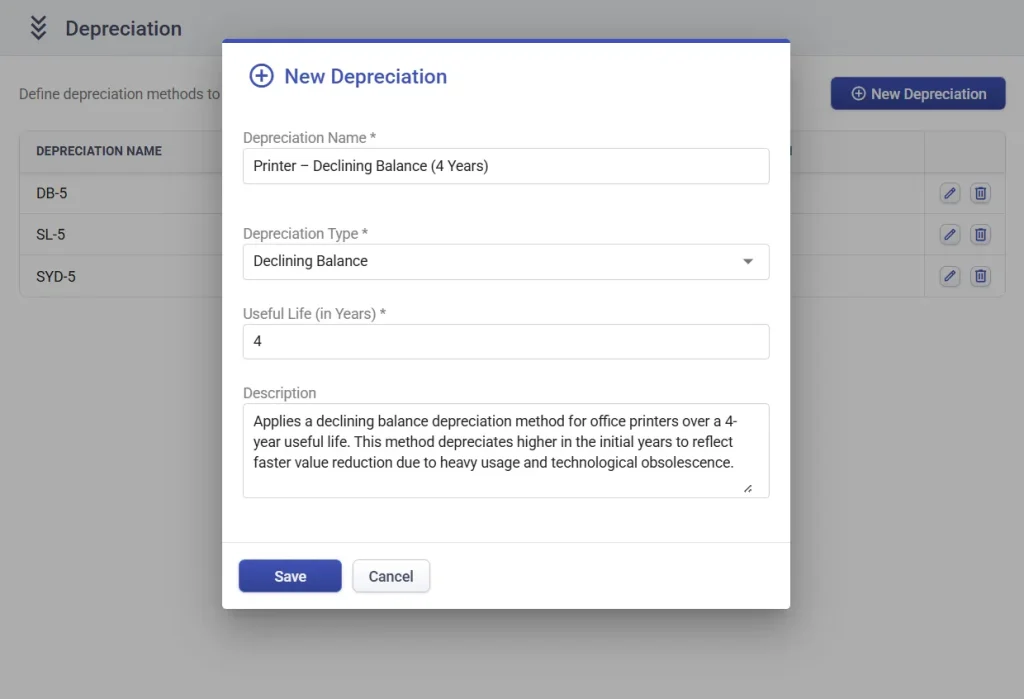
Click Save. Your depreciation rule is now available for asset selection.
How depreciation appears in the asset creation form
When creating a new asset or editing an asset in Desk365, you can apply a predefined depreciation rule directly from the asset form.
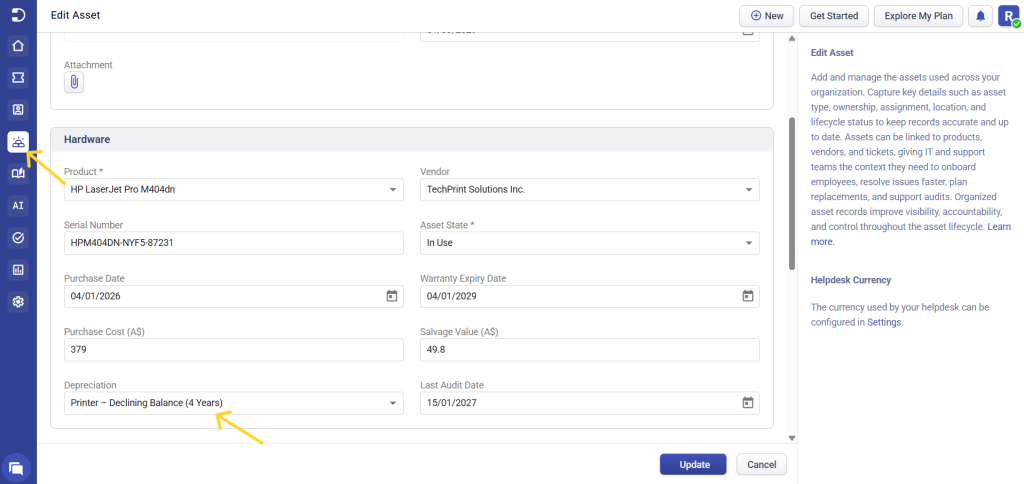
Once you enter the values or update them the calculations are handled automatically based on the selected depreciation rule. No manual formulas or external spreadsheets are required.
Desk365 will automatically calculate:
- Monthly depreciation amount
- Accumulated depreciation (based on months elapsed)
- Current book value
There is no need for manual formulas or spreadsheets. The system keeps the asset value updated automatically based on the purchase date and selected depreciation rule.
This ensures consistent financial tracking, accurate reporting, and better lifecycle management for IT assets.
By combining asset type structure with automated depreciation, Desk365 helps IT teams manage assets not just operationally, but financially as well.